Get your data local: Setting up Network Attached Storage (NAS) and your first steps in self-hosting
Posted on Fr 30 Januar 2026 in personal-ai
If you're just getting started with local AI and local-first development, one of the initial hurdles will be getting your data local.
More of an audio-visual person? Check out the accompanying YouTube video on the Probably Private channel if you'd rather watch and listen.
Why should you store data locally?
-
Ease of use: If you're developing your projects locally, it's a lot easier if that data is already on your local network. The initial hurdle of downloading or transferring data will almost always be the slowest part of your setup (outside of training models from scratch) if you don't store data locally.
-
Better control and understanding of your data: by keeping your data locally you have more control over what accesses your data and how it's used in your data/AI/ML workflows. In addition, you can run tools over your data to get an understanding of your data which can give you new insights about what you might want to build.
-
Security: having a local copy means that if something is lost or breached, at least you have your backup. In addition, moving away from less secure services or apps and using a hybrid setup of your own can improve your security posture overall.
-
Self-hosted apps have significantly improved: you can now run many apps and software that are openly available to do obvious tasks, such as manage documents, highlight photos, stream music and run routine tasks.
Interested in getting your data local? I'll walk you through a few steps to ensure that your data is appropriately set up for your local-first projects.
Choosing your hardware
You'll first want to decide what type of computer to buy for storing your data. I'm a fan of having one computer just for data backups and for a small amount of software you want to use with that data. In my experience it's good to choose something that's not your GPU-enabled machine because you want it to be smaller and cheaper to run as it will likely be on most of the time (especially if you automate some of your backups).
First, you might want to guesstimate how much storage you will need. It's fine to start smaller and then either buy a second computer or practice data minimization to better manage your storage. For me, I looked at the data I wanted to backup (documents, photos, self-traced data, computer backups) and calculated approximately how many gigs that was. Then, I multiplied that by 2. That's been more than enough for my initial 7 years of self-hosting my data, especially if you set up data hygiene (removing duplicates, removing older computer backups, consolidating documents, etc).
Pro Tip: Spend some time cleaning up and consolidating the data you care about BEFORE baking it up. This is general good practice for both you and anyone who might need to look at your data one day.
You'll also want to figure out any other features you want on your device. For example, you likely want an ethernet interface, you might want to look at energy expenditure or ways to expand the storage (i.e. extra slots to add more storage later). Don't overcomplicate your choices if it's your first setup, start small and simple!
I chose a Network Attached Storage device (or NAS), but you might want to choose a beefier computer with more chip power and RAM if you're interested in self-hosting a lot of apps, software or functionality. If you also have a GPU computer setup like mine you could also move to the larger machine as your workflow grows, so again, don't overcomplicate where you backup your data.
Once you have some basic specs, you're going to want to also decide on how your redundancy works before clicking buy. Let's dive into how RAID works to help you ensure you have enough safety in your storage.
Trusting your setup (RAID)
You'll use some version of RAID (Redundant Array of Independent Disks) to ensure that your data is stored safely. RAID was invented in the late 80s as a way to ensure data is properly backed up across multiple disks (you will use HDD (hard disk drive) for this).
To determine what works for you, take a look at the RAID levels and choose one that fits your liking. Probably this will be RAID-5 or RAID-6. A cool thing about RAID is that it uses coding theory and error correcting codes to ensure that if one of your storages fails (i.e. your HDD in slot 1 breaks), there is enough information and parity bits on the other storages that you can fully recreate the data via the error correcting codes.1
Now that you know which RAID you want to use, you can make the final calculations of the storage you need on your NAS device. This means you'll need a minimum amount of disks (i.e. the minimum based on the RAID you chose -- 4 disks for RAID 5 and 5 disks for RAID 6) and each disk should have enough for your storage x some overhead (that you calculated in step 1).
I recommend looking through online or local computer store options for NAS computers and choosing one that meets your specifications. A lot of the modern NAS devices have easy ways to swap out drives or expand drives, making them especially easy for home use.
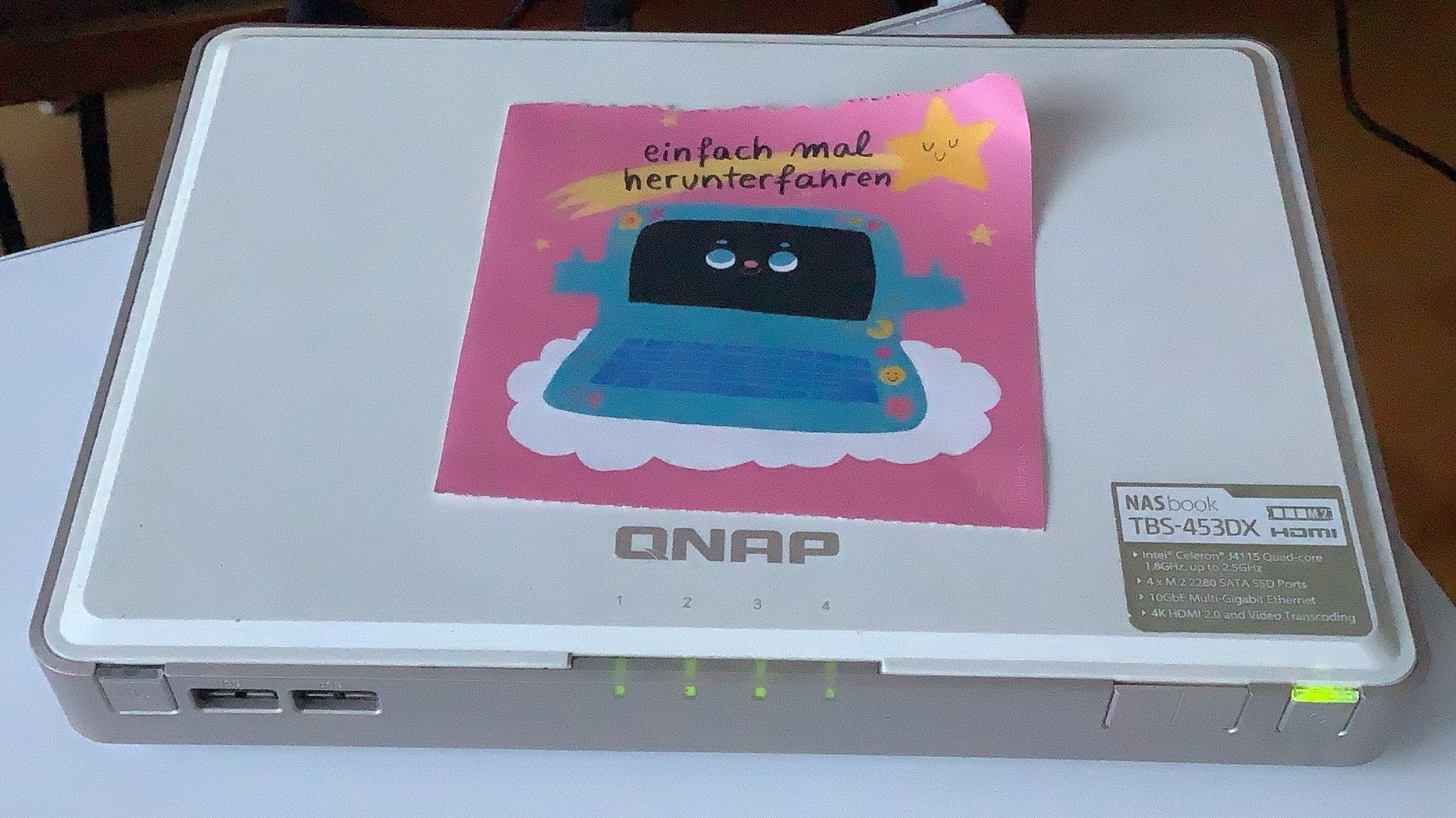
This is my 6-year-old 4-disk RAID-5 enabled NAS that's been happily running some random scripts along with backups and a few apps for the past 6 years. I have it running debian-server without any issues. I bought these from Jacob.de. Here's a breakdown of the components and cost.
| Component | Name and Description | Price (in EUR) |
|---|---|---|
| Housing and computer | QNAP TBS-453DX M.2 SSD NASbook - NAS-Server | 539.03 |
| SSDs | ADATA XPG SX8200 Pro - SSD - 2TB (263.05 per drive) x 4 | 1052.20 |
| RAM | PHS-memory 16GB RAM Speicher für QNAP TBS-453DX-4G DDR4 | 119.46 |
| Total | 1,710.69 |
You'll find that NAS servers have become much less expensive than 6 years ago, and hopefully that will continue as more people move to self-hosting.
Of course when moving your data, please follow the 3-2-1 rule for storing your data; meaning 3 copies (like on your computer, your NAS and a cloud you trust), 2 different mediums (on 2 separate computers) in at least 1 remote location (i.e. in a cloud you trust or have a backup server in another location).
Once you have your NAS set up (see next step), you'll actually make sure your RAID is running. If you're using Linux a popular choice is zfs. I think this guide on using ZFS with your RAID choice is a good starting point, but I'm sure you can also use the documentation or follow a tutorial online that fits your liking.
However, if you don't want to use linux, you can literally use whatever operating system you like. Let's talk a little bit about operating systems and networking, as those end up being sometimes the sticking points that make self-hosting "too hard" or where people get stuck.
Operating Systems and Networking
I've been a linux user for more than 15 years, but I know I might be an outlier there, so really my first advice is to just start with an operating system you like.
If you use Windows regularly and like it, install that! If you are comfortable learning linux and have used it at least once for work, maybe get started with Ubuntu as it has a nice interface that should be easier to learn. If you are a Mac user and want to support automated Mac backups, consider a Mac-Mini or something similar.
Regardless of your operating system you should be able to check:
- How do I set up the RAID level I like?
- How do I test that?
- How do I then automate my backups
- How do I connect my GPU-enabled machine for my AI/ML workloads?
So long as you can make those steps happen, it really shouldn't matter what operating system you use.2 Obviously package support will vary depending on your operating system, but if you're just using your NAS for storage and then your GPU machine for training, inference or other math-heavy workloads, you should be fine.
Networking is another sticking point that some people get stuck on. First, you might not actually want your data to be accessible outside of your home network, so I would recommend starting with just getting your services working locally. Then decide how you'd like to use your local storage when you aren't on the local network.
Usually you'll set up some sort of VPN. I've had good experience using TailScale, but choose one that works for you.3 In addition, you'll likely want to better control your home router, which is why I use openwrt. More on this soon!
Choosing something you're motivated to use or do
Finally, the most important part is to make sure you choose a project you're actually motivated to do. My journey into NAS and self-hosting started because I wanted to back up my photos somewhere that wasn't Google or iCloud.
For you, it might be similar, or another thing you like doing; like hosting your saved bookmarks, recipes, books or anything else. There are so many self-hosted applications and interesting guides for people new to self-hosting, probably just searching "self-host [Your idea here]" is enough to get you started. I can also recommend checking out the selfhosted subreddit for inspiration.
Choose a project that you feel passionate enough about that when you hit a troubleshooting problem you are still motivated to fix it. Of course, take a hot cocoa or tea break in between or even let a few days pass, but if you're motivated to overcome the initial obstacles you find in moving to self-hosting your second, third and fourth projects will benefit greatly.
Like with many things, starting a bit smaller and growing an idea over time has a lot of benefits. Be patient and enjoy the learning process. I'd be excited to hear how your self-hosting journey goes.
-
If you want to learn more about coding theory, I highly recommend Mary Wooters course. ↩
-
I also always choose self-installed linux because it generally has relatively good support for security patches. Whatever OS you use, make sure you are regularly updating your security packages -- and I would steer away from using an OS that you haven't used that comes pre-installed on your device, as it might be a cheap linux-based but not updated image. ↩
-
Some VPNs have pretty awful practices when it comes to privacy, so please make sure you choose a trusted and audited VPN to make sure they aren't tracking and selling your private data. Here's one horror story from Urban Proxy VPN. ↩