Spying on your agents: A privacy- and security-focused guide
Posted on Mo 19 Oktober 2026 in privacy-observability
In this mega-post, I'm going to introduce you to why I think you should spy on your agents. Not only do I think this makes clear why privacy and security are so essential in agent setups, but also I think you can learn a lot about how agents work.
Also, I think learning more about what your agents are doing can help you think through different approaches to agent harnesses and software software. By doing so, you'll also explore different guarantees and protections when it comes to your data.
To help you navigate and jump sections as you see fit, here is a table of contents:
If you have questions or additional sections you'd like to see answered, please write me and let me know.
Reasons to spy on your agents
There are many reasons to spy on your agents. Here are a few:
- Analyze AI cost and spending
- Monitor your agents performance
- Determine latency and availability
- Understanding your use cases
- Setting up and running evaluations
- See how agent software actually works
- Protecting your privacy and sensitive data
- Establishing secure defaults
- Because spying can be fun and agents are not people ;P
For this reason, setting up some forms of tracking both the things you instruct your agents to do, but also what happens once they are running can be insightful for how you build, administer and control agentic workflows.
Observability for agents is a pressing need at most organizations for better visibility, particularly if there is more than one AI vendor and more than one tool in use. Starting to think through observability for privacy and security can help demonstrate why bringing some of your observability data out of the AI vendor tooling and into a service you (or someone else) runs for yourself can assist better security and privacy engineering choices.
What is Observability Engineering? How is it different from monitoring?
My favorite reference is the awesome O'Reilly book Observability Engineering by the HoneyComb team.
I will cite one of my favorite quotes from the book:
A production software system is observable to the extent that you can understand new internal system states without having to make arbitrary guesses, predict those failure modes in advance, or ship new code to understand that state. In this way, we extend the control theory concept of observability to the field of software engineering. --Chapter One, Observability Engineering (O'Reilly 2022)
Let's break down this definition. It means we observe a system:
- To make it understandable
- So we can make educated guesses instead of arbitrary ones
- To "see" errors as they happen (even in internal states)
- Without needing to change code
You might already be very excited, because many of these things would be excellent to have as built-ins for today's agentic systems. If you can understand how they work, see or make educated guesses about what is happening and not have to change the model or harness to do so, you could probably greatly reduce errors happening and also gain trust in the system.
Another useful anecdote from the book (which you should read!) is that with observability engineering it no longer is the most senior engineer who has worked on a system for years who is the only one that can judge a failure. Instead, even someone new to the project or setup, someone directly out of school should be able to "observe" the system and have a pretty good idea (and evidence) of what is happening and where you might be able to fix problems.
For topics like privacy and security, this visibility is often too little, too late. Which is why especially for automated systems of high value, like agent workflows, you want to think through observability before granting more access and trust.
What tools are used for observability?
In order to observe a system, especially clearly enough to debug new systems quickly, you'll need observability data, and you'll have to think through how to organize that data so that you can actually "see" things quickly and clearly.
Open Telemetry
The top tool (well, standard!) for collecting observability today is OpenTelemetry. Started as a merger between two projects (OpenTracing and OpenCensus) and managed by the Cloud Native Computing Foundation (CNCF), OpenTelemetry has become the gold standard for integrating reporting from your applications and systems into true observability data.
OpenTelemetry has a few core concepts to understand:
| Name | Description | AI/ML Example |
|---|---|---|
| Trace | A record of a path through an application and/or system | A chat conversation between a customer and an agent, with all of the touch points in-between |
| Span | One step in a trace (from one component in the overall application/system) | One HTTPS request to an AI provider |
| Log | One "step" (smaller than span usually) in a process | A log entry confirming that the HTTPS request to the AI vendor received a successful response (200) |
| Metric | A measurement (number) associated with a span | Cost for the aforementioned API request |
| Context | Correlated data so that you can link traces and spans across distributed systems | The trace ID and parent span IDs so you know what originated the call to the AI vendor |
| Propagation | Handoff of context across distributed systems | Core observability libraries for LLMs/operating systems help manage this |
| Baggage | Additional data that you would like to send between systems | What model parameters are being used or what client version |
| Profiling | ebpf instrumentation to sample Operating System and hardware memory, traces and calls | CPU-memory usage for self-hosting LLMs (prefill metrics) |
You don't need to memorize these terms, and most of the people reading this blog won't even need to instrument the telemetry, but I want you to understand the language around telemetry and be able to use specific words to define exactly what it is you are talking about.
Once telemetry data is being produced by the software, hardware and intermediary systems in your setup, you can start collecting it via "collectors". These can sit at different parts of the architecture, and if needed add additional information about what is happening before sending it to another collector.
Ideally you keep it simple, but of course trust your infrastructure, architects or SRE teams with how you might best integrate telemetry data.
Once you have observability data running into some sort of main collection, you can then work with whatever software or systems you have available to surface trends, incidents and better understand your system. We'll dive deeper into how to use that for privacy and security in a later section.
LLM observability
For LLMs and similar text-heavy models powering most agentic workflows, there are developing standards around telemetry attributes and metrics. Let's look at a few that have become widespread that are relevant for privacy and security visibility.
Note: you can also take a look at OpenTelemetry's direct documentation for GenAI as the standards evolve and change.
| Name | Description | Example |
|---|---|---|
| gen_ai.request.model | The specific model name used (or "default") | "opus-5.5" |
| gen_ai.client.inference.usage.input_tokens | Tokens used in the user/client request | 213 |
| gen_ai.client.inference.usage.output_tokens | Tokens used in the AI providers response | 1123 |
| gen_ai.output.messages | Message or message choices given by the model as a response | "I'd love to help you..." |
| gen_ai.output.type | The type of output (image, text, speech (audio files) or JSON) | "speech" |
| gen_ai.system_instructions | The system prompt used, which your team might have set up | "You are a helpful assistant..." |
| error.type | Should an error be encountered, this will give you information on the type of error/exception | timeout, software exception |
Many of these attributes start with "gen_ai", which can be a useful filter in your observability to specifically investigate LLM or other generative AI problems. That said, you'll eventually want to connect those with other data happening in the overall system, particularly as you get into details around security.
Note: for best privacy practices, please always consider data minimization. There will certainly be sensitive data leakage in LLM traces. Treat traces as you would any sensitive data, see later section for more details.
Depending on your setup, you might want to add even more attributes to track, but you will quickly learn that that means more cognitive overload for you to combine those attributes and metrics in a meaningful way.
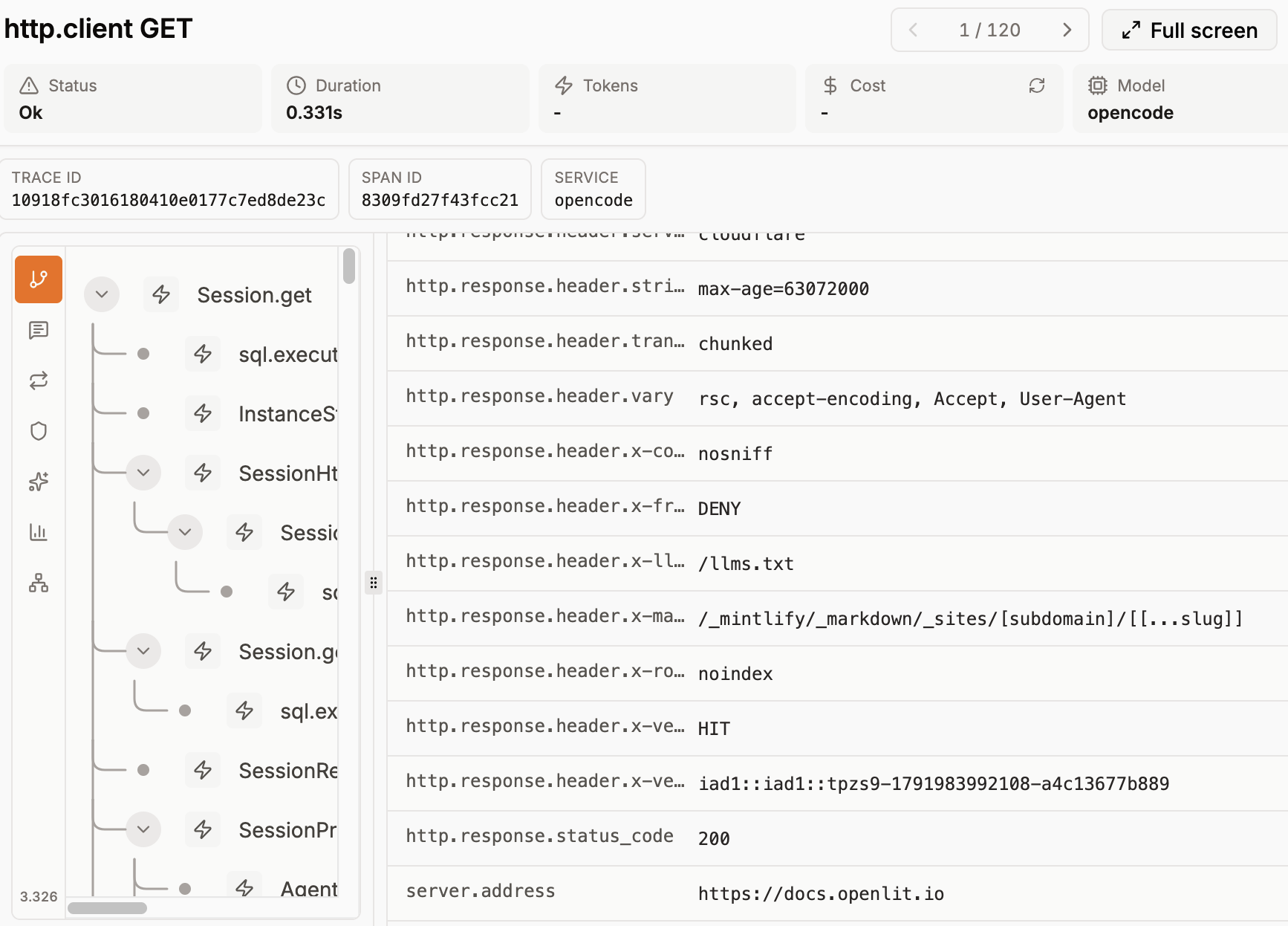 My OpenCode agent's GET request as seen from telemetry
My advice: start with a smaller amount and see if you can track the signals you want and need for your work. As you get those working, figure out what questions and problems you "cannot see" and then work on those only once you have enough information to ask good questions.
Likely you're also curious about spying on other things than just the LLM, like your agents. Let's look at agent observability tags commonly instrumented so that you can easily turn them on.
Also for agents
Outside of the LLM calls I recommend tracking above, agents have a lot of "baggage" that they come with. A usual agent harness has:
- A bunch of software, often precompiled so without source code
- Built in "tools" or "plugins" that allow for easy data access and often for connection to other services (like Model Context Protocol (MCP) servers to get data out of services)
- Their own versions of "sandboxing" and integration with your OS sandboxing (often)
- Additional data storage for things like system prompts and "memories"
- Additional software for testing and evaluation
- Sometimes their own telemetry and/or logging setup

This means that there are probably several very interesting areas for investigating privacy and security, some which might be more accessible to you and others that might not have any open telemetry instrumentation (sadly).
Here are a few things to definitely track if they are available:
| Name | Description | Example |
|---|---|---|
| gen_ai.agent.name | A name you can give the agent, which is ideal even if operating on behalf of a user | "data_eng_pipeline.agent" |
| gen_ai.agent.id | A unique ID for the agent, which can be requested from some providers | long_string/hash |
| gen_ai.operation.name | The "next step" in the generative plan or execution, including things like starting agents and fetching memories | plan, search_memory, retrieval |
| gen_ai.tool.definitions | Which tools are installed and the prompts and other data sent around how to use the tools | "WebSearch" |
| gen_ai.tool.name | The tool call made by the agent, unclear whether this is emitted before or after the call | WebFetch, WebSearch, Read, Write |
You might need to think about other visibility measures for the parts of agent workflows you cannot see, especially for security measures. Since the software and tooling are not always 100% instrumented and visible, this means thinking through (and testing/red teaming!) to understand what you can observe and what is likely something you'll need to assume can happen and just protect against.
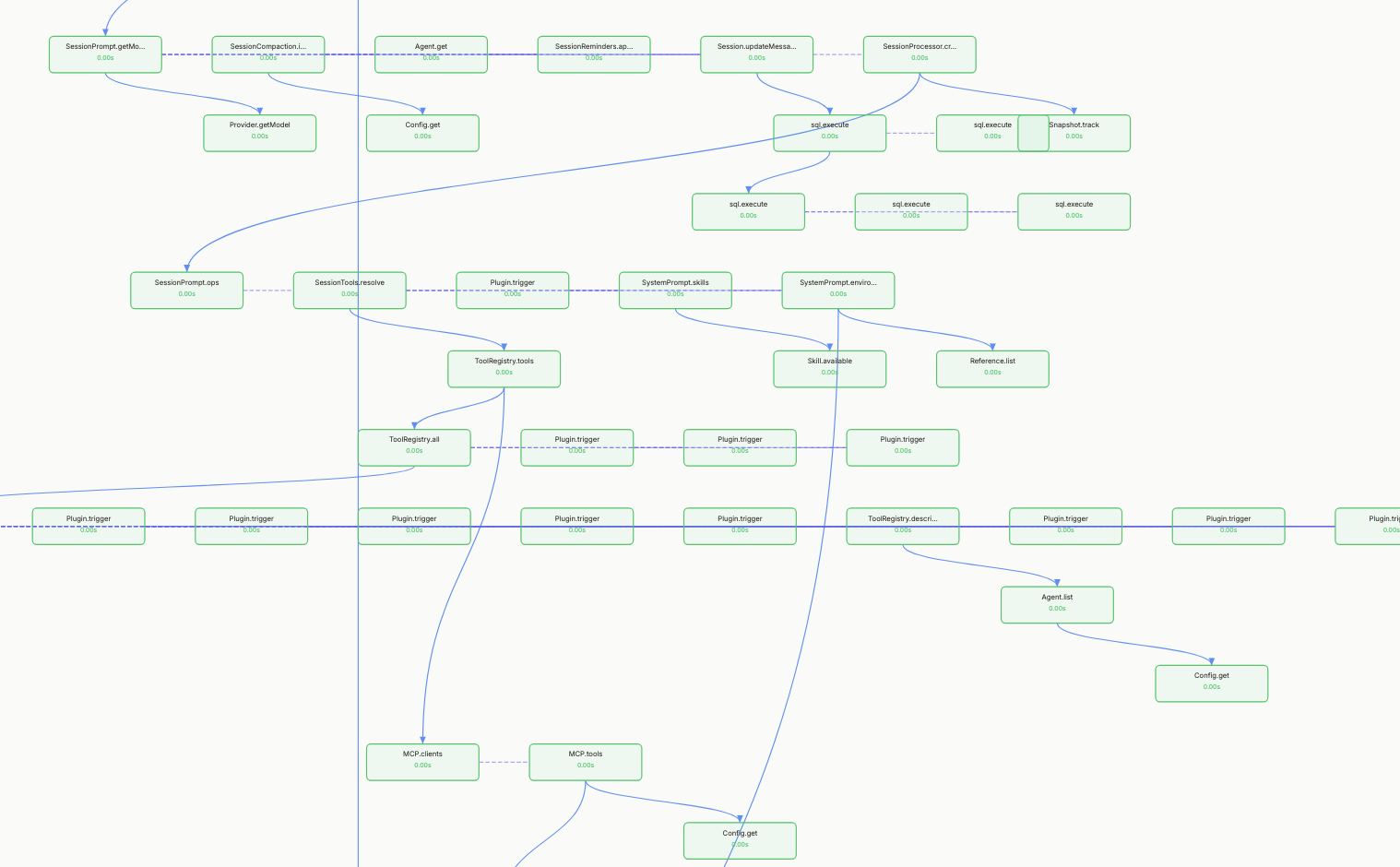 An OpenLIT graph view of my OpenCode agent calling tools (here listed as plugins) and then an MCP server
Since some agent harnesses/software and/or tooling come with their own observability integration, you should check the details and see if it could be useful. This also means checking to confirm if telemetry is sent to the provider and if that telemetry is acceptable for you given your privacy and proprietary data concerns.
If you've reached the end of what you can track normally via already instrumented libraries, software and tooling, you'll probably end up looking at how to add system-level instrumentation to "see" what is happening on the computer(s).
If you've reached this state, you'll be happy to learn about Extended Berkeley Packet Filtering (ebpf), which also has some integration in open telemetry standards.
Getting in the gritty: ebpf
Extended Berkeley Packet Filtering (ebpf) is an in-kernel execution engine and programming layer that lets you ship programs that can be compiled, verified and run directly inside the kernel. This has great benefits for security, observability and even to avoid tricky parts of linux kernel calls if you wanted to do so.
For our purposes, you'd want to use ebpf to do things like:
- observe if your agents are making unexpected calls to the Linux kernel
- validate that what is happening in the traces matches what the actual host or VM sees
- filter calls directly in the kernel (if necessary)
- block particular calls at the kernel level
I think you'd likely go in that order and you might not need all of those, but if you end up finding that the widely usable agent software/harness at your organization has some bugs, this might be an easy way to protect your infrastructure while allowing people to use agents.
One project that caught my eye using ebpf was AgentSight, a research and startup project focused on tracking and blocking agent actions using no instrumentation monitoring with ebpf.
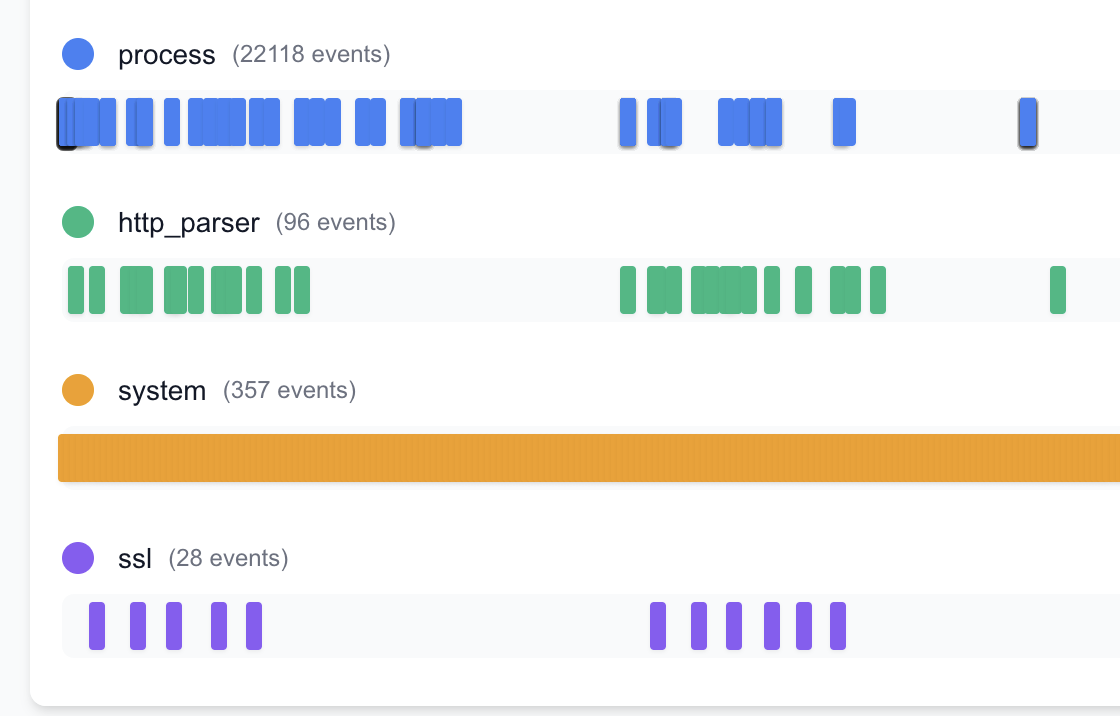 *A "view" from AgentSight to show how different the calls look when looking from the kernel perspective
How does this work? Well, ebpf allows you to trace a particular process at the kernel level. What does this mean? It means all calls from that process (including spawning new processes) can be observed and collected from the kernel point-of-view (meaning at a very low level for a completely different perspective than application-level monitoring).
This can provide everything from a complete breakdown of every call and its parent call, allowing you to span many trees at once, to a view from the actual socket-level interface, meaning you can "see" traffic before it goes over the network or before it gets transferred from the network to the agent process.
There are several ebpf tools also integrated into container development and a variety of different operating system implementations (mainly Linux), which you could start with to get an idea of what ebpf data is useful for your security and privacy requirements.
In addition, if you are running some smaller models yourself on GPUS or other compute, you can also use built-in OTel profiling + ebpf to analyze the memory and compute usage directly.
This can help you look for potential inefficiencies in how your serving infrastructure works and also communicate problems in load or latency early (at the hardware level). Should there be a GPU kernel bug, you might also be able to "see" it there first (although there's sadly not a lot you can probably do at first other than offload serving).
Networking data
Networking data can be instructive on many security questions, but is also relevant for potential privacy errors or mistakes. For example, accidental data exfiltration affects both privacy and security risk.
The types of networking data that are usually interesting to watch for things like potential indicators of compromise are:
- Established TCP connections
- DNS traffic
- Packet flows and metadata
Within a packet you can investigate particular metadata, such as ethernet address, IP address and ports. Usually you are not interested in such data unless you are a network operator; however some networking security tooling may use such information to determine particular abnormal behaviors.
Generally you'd be observing either DNS traffic changes or packet flow / TCP connection changes. If you have a baseline or an average throughput this can help you then determine that something has gone wrong and may need further review or inspection.
For example, if a container normally does 500kbs/sec of throughput and then it does 10x/100x more traffic for a shorter period, it may be that it is transferring data to another endpoint at scale (potential exfiltration marker).
Another example: If DNS queries are normally 10/second and then spike, the agent might either be performing strange "work" or you might have joined a botnet DDOS, or there might be another problem worth investigating. Same for TCP connections skyrocketing.
If your organization already has networking support from a network security tool, you might want to ask if this tooling or if the vendor also provides anything to monitor containers or sandboxes for agents. Setting those flows up in a way where other network visibility is measured can help you understand how agent workflows "look" and how they compare to other network security concerns you might have.
Now that you have many different views of the types of data you can collect, the question becomes, what should you prioritize? Ideally, you're starting with priorities you have based on the risks and threats you have identified.
What do you trust (i.e. agent software, model or system?)
I've shown you a bunch of different ways to observe interesting parts of your agentic software and systems, some of which you might need, some which you might not.
In the end, rather than instrumented everything all at once, you'll need to prioritize what you think is a good starting point and then go from there once you get to know the data and patterns from that perspective.
But how do you know where to start?
Here are a few questions to get you started:
- After running threat modeling1, what threats are you most concerned about? Are any of them easily observable?
- What parts of your system do you know and trust and which parts are you unsure about?
- Where are the trust boundaries in these workflows? Can you establish observability before and after handoffs that "reach" over those boundaries?
- If testing out new agentic software, what do you absolutely want to check before running it with sensitive data?
I recommend first testing out your ideas (if possible) on a smaller system and with red teaming. Did you "see" enough to determine that something was going wrong? If not, instrument further until you can identify the attack pattern.
Then move to a sampling method of the flows you are interested in to get a better idea of how much data you'd ingest on a larger setup, before actually sampling a larger amount from a larger system (if that is your goal).
Note that if you start sampling from production, you are now definitely sampling sensitive and person-related data. Read on for some advice on how to best manage that.
Privacy problems in Observability systems
As you have gathered by now, observability data can contain quite a bit of sensitive information. Not only do you have all the privacy risks of whatever people type into an LLM- or other generative system, you also have the risk of whatever additional data the system is emitting, such as networking requests, confidential documents and metadata, or other potentially internal-only information about your system.
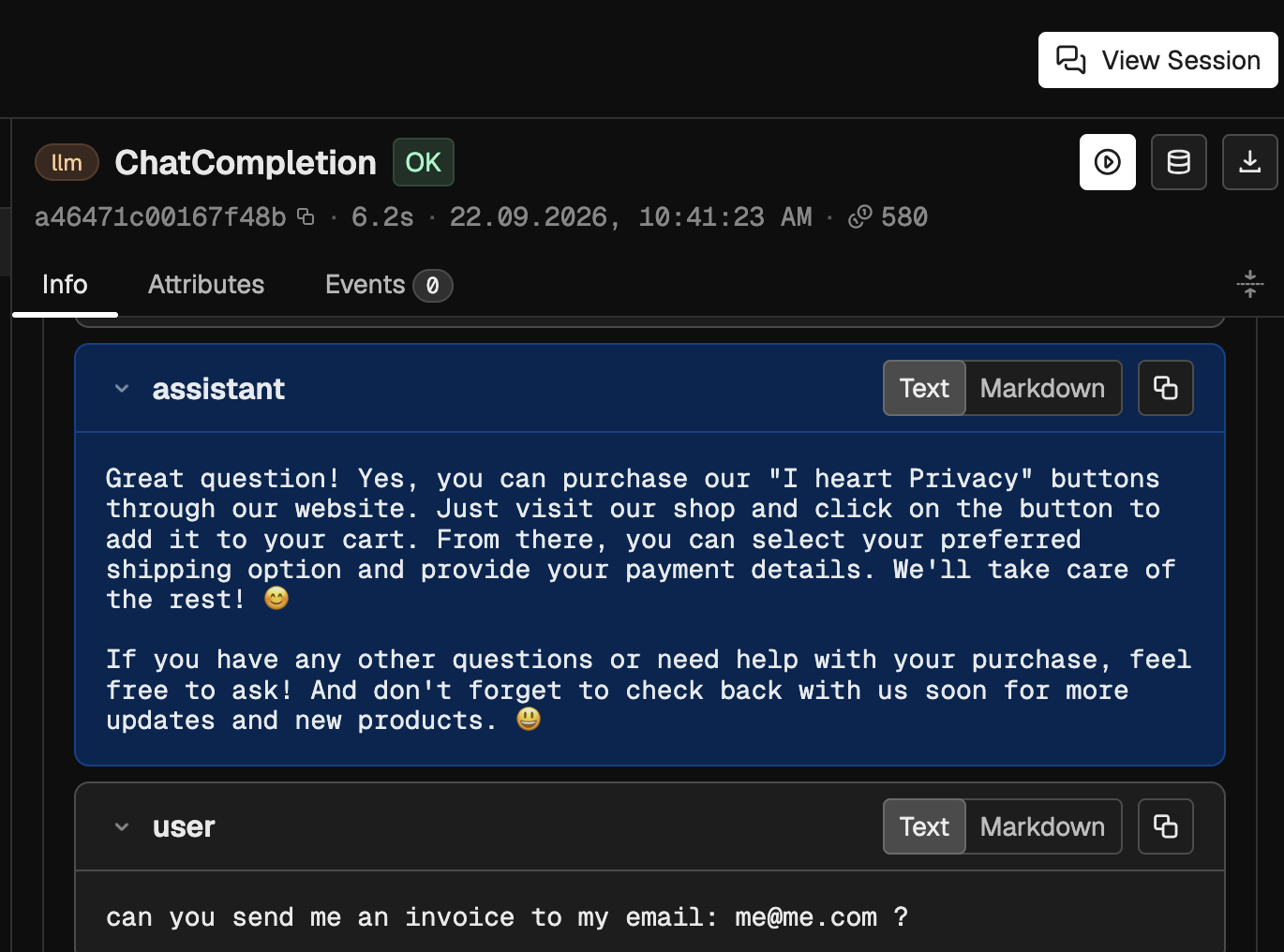 An example trace, users will type in sensitive data to chats/interfaces
This means that your observability, which you want to help maintain your systems and ensure they are working as expected, needs its own sanity check in terms of privacy and security controls.
Depending on how you set up your observability, it might mean any of the following:
-
Data Minimization at source: Adjusting your instrumentation so that less data is emitted from the sources. This means starting smaller and calibrating as you go. If additional debugging or information is needed, it means adjusting those configurations or having a small setting to temporarily emit more information.
-
Minimization and controls at main collector: If you don't want teams tinkering with the instrumentation, you can also set up filters at collectors which allow you to drop additional metadata or information before it is ingested and saved. This is a useful way to allow teams to set up their own instrumentation but still manage privacy and security within that observability data before it is consumed. This also means you'll likely want some governance around how those filters are decided and also have a process where teams can petition for either temporary storage of additional parameters, or setting some custom metadata and tags for things they might need for their own work.
-
Protections and limited access and retention: A final option, and just good practice anyways (in addition to 1 or 2) is to treat traces and other observability data as sensitive and confidential. This means limiting access to observability systems, except where teams might need aggregate data to make their own decisions. You can set these up to especially protect things like text input, logs and other unstructured data. This should be encrypted at rest and in-flight and be kept under stronger data retention rules, such as a limited retention window. When people need the data for product development, debugging or for your own privacy work, ensure that you understand the purpose of that data access and set up safe ways to manage that sensitive data while you and others are working with it, including protections like pseudonymization and choosing where and how that data is processed.
In general you will need to set up some ways to sample and work with things like observability data if you want to use it in your platforms and AI/agentic systems. It's highly unlikely you'll get a lot of information or signal out of trying to look at everything all at once.
What might make sense is to first look at metrics that make sense for what it is you are trying to "observe" and then sample subsets of the traces that show you what is actually happening. You'll walk through a few examples of this for privacy work in the following section.
Privacy Observability
Generally, observability is pretty limited for privacy work. To some degree, it's the nature of privacy work to not surveil things (system or otherwise!). However, I believe that setting up some limited observability can often benefit not only your own privacy (if that's what you are using it for) but also better instruct what parts of your privacy engineering are working (and maybe which are not).
Privacy observability is applying observability engineering to privacy in computing. Essentially, is my system working the way that I think it is, with regard to privacy (either my own or my privacy engineering controls)?
Let's look at some concrete examples to get more insight.
Example: Data classification observability and evaluation
In our initial example, you have a classification system either already integrated into your data and AI workflows or you are testing one actively for your purposes. Ideally, these flows are observable to you and you can collect some telemetry data on that pipeline.
An example classification system could combine a few aspects:
- Presumed sensitivity level
- Is personal data
- Is proprietary data
- Is internal-only data
- Is external data
- Is aggregated
- Is anonymized
- Is pseudonymized
- Collected for processing activities A, B, C (etc)
- Data deletion date
The questions that the privacy team has are:
- Is our current classification metadata (like tags) accurate and updated?
- Are there examples of untagged or unclassified data being used in workflows that we need to investigate?
- For the classified flows, are they matching what we expect based on our understanding of the AI use or system?
For this, you might first add the classification metadata or the classifier output as a normal part of how you process the data so that it is available at every telemetry collection point.
Then, you can imagine collecting the following:
- Data classification level (either directly known or predicted or unknown)
- If unknown, run classification model (if available to predict) and attach as additional metadata (predicted_classification)
- Processing purpose (tagged at job runtime)
- Processing step (tagged per step in the process, connected by spans)
- Data classification level (reassessed if the processing step is a declassification step, such as anonymization or other privacy control)
- Final data store with additional tags in store
The privacy team can then get a high-level view with aggregated statistics to determine if that matches their expectations, or get a more granular view based on investigating particular spans, perhaps with support of other telemetry data or system documentation from the data teams.
If the classification model provides additional information and works well, the privacy team can keep testing and building out representative datasets to assist in prompting, training or fine-tuning a model to fit the organization's privacy requirements and data types.
Example: Improper data transfer
If you are enabling things like agentic workflows in your work, you might want to understand and determine if data has been sent somewhere it shouldn't.
To observe potential dangerous transfers (both malicious and simple mistakes), you'll want to get a few different views of your agent workflows in order to put in proper observability and gates to ensure data stays where you think it belongs.
Initial observability
To get started, you'll want to begin collecting traces for any tasks where you will give an agent access to sensitive data. If implementing at an organization, ensure you are protecting these traces accordingly.
If implementing for yourself I'd recommend setting something up on a local server. Make sure you have enough storage and that you have a plan to actually investigate your traces.
Additionally, you might pull in some starting statistics on your networking (DNS lookup information and packet flow statistics) and spend some time setting up sandboxing to ensure that only approved domains are reachable.
Testing what you can see
Ideally you actually have a safe way to red team your setup and to try to poison your agent into doing something dangerous (presuming you have appropriate controls to test with dummy data).
In doing so, look at your observability. Were you able to identify the dangerous behavior? If not, what did you miss? How can you better instrument your choices?
I have a YouTube series on getting started with Red Teaming, which might be useful if you are starting out in attacking systems.
If you were able to actually see what was happening, how might you set up a way for you to both implement controls to catch it and also alert and detect automatically if something adversarial happens in real workflows?
Ideally you can run a few different tests with different strategies in order to feel more confident about using your sensitive data.
Advanced controls and observability
As you move further in your observability journey you can probably better predict how and when things should be observed. In doing so, you will end up collecting fewer traces and instead collect the traces that matter for the jobs and workflows you actually run.
You also will have time to build out appropriate controls, either at the agent sandboxing level or at other "gates" in your system. This can look like a data access "gate" that can decide based on policy if the agent is allowed to access the data or only gets a dummy copy, a pseudonymized or anonymized variant or if it can access the real data.
At that point, you can actually observe your policy gates and sandboxes for things like inappropriate requests, rejections and approvals. By keeping an eye on your controls, you'll feel more confident they are both functioning correctly and over time notice aberrations or improvements for your systems.
Observability Data Science
As you might have understood thus far, observability involves working with quite a bit of disparate, semi-structured data. Luckily, there's an entire skillset available for that called data science (in case you don't remember that before LLMs, haha).
Data science work involves using data engineering, preprocessing, statistical, mathematical and machine-learning-assisted understanding to find patterns, signals and anomalies. Essentially: ways to discover important information in data.
Let's investigate how data science can support your privacy observability.
Finding signal in noise
When you first implement observability, you'll likely be collecting quite a bit of data, much of that also sensitive.
This means learning how to manipulate and work with data with the least amount of people actually touching and seeing the data first-hand (especially in organizational setups).
A few ideas for initially working with the data is to split questions into two categories: general questions (unsupervised understanding) and specific questions where you can likely nail down a numeric answer or a statistical framing.
For your more general questions, you might run language clustering and analysis. What types of tasks are people using AI for? How might you better support the types of actions they want to use AI to take and which ones actually need sensitive data and which do not?
Also for generic questions, you might look at flows over time. Things like bursts in flows, which websites are agentic workflows accessing, what types of data access requests come in and what does a "typical" set of workflows for different job categories look like.
For more specific questions, you might focus on an area you are particularly interested in or concerned about. Zooming in on something like customer data access, or looking at flows to new network endpoints might take priority. Then establishing a baseline understanding of which flows are "normal" and which look "abnormal", and building that into a statistical question is an essential step to grabbing that "signal" from the noisy data.
As you progress in your data science observability journey, you'll better understand which types of data are important for the types of concerns and workflows you have. In doing so, you might be able to design systems so that signal is more obvious.
Building your systems for observability
As you mature your privacy observability, you will determine what types of systems you care most about and you'll better understand how to observe the most interesting and relevant risks and controls.
Even in complex setups, like agentic workflows, this requires spending some time shaping the architecture and tasks to fit what you need in terms of detection, scalability, and security / privacy controls. Specifically, this means having an idea of which different workflows, tasks or pieces of your privacy engineering infrastructure should be observable and how. It also means keeping this observability data distinct enough that you can actually understand when something goes wrong.
Currently many agentic systems are built as generic workflows. This serves no usefulness for security and privacy, because saying "this agent can do anything" doesn't allow you to appropriately shape policies, controls and observability.
If, however, you can get more specific about what you are trying to achieve: "this agent helps software team A with QA development and testing", you can set up much cleaner controls and more specific observability to understand when something goes wrong.
Let's investigate a few options for such workflows.
Task specificity
Setting up specific task types or repeatable workflows which can be fully or partially automated will help you find signals in your agentic privacy and security observability quickly and additionally guide better controls over time.
For example, setting up an agentic workflow that performs a specific set of tasks at a particular time, such as going through your meeting invites and responding or rescheduling according to your calendar, will have a very specific set of controls and observable behaviors.
If a poisoned meeting invite enters that workflow and the agent software/harness starts sending traffic to a new endpoint, or starts opening unrelated files in the working directory, or schedules a new task that is unrelated to calendar work, this becomes an obvious violation of that workflow setup and is "easy to spot", so long as you have appropriate observability.
By comparison, an agent that "helps with your email" with no other guidance or specificity is harder to contain and certainly might be more difficult to gauge what is expected and unexpected behaviors. Scoping that to a subtask, like "email prioritization" creates a narrower definition which now has appropriate controls.
Here are some example workflows where you can see how better defining the task opens up new controls and even smaller or task-specific models that cannot escape a sandbox. :)
| Task | Data Usage | Model | Controls |
|---|---|---|---|
| Email Prioritization | All email or just some? Also attachments? | Tested LLM model with data eng pipeline | Entity pseudonymization, no training data, regular evaluations + phased trial |
| Best Images | User tagged images on social media | Image-to-text + Image classification with data processing pipeline | Face pseudonymization + extra opt-in |
This is not to say: don't use an agent while you are still learning what it can do. However, it is advisable to observe those agent workflows carefully as you get started with an aim to both ensure the privacy and security standards you'd like to have, but also to pay attention to how you might break off smaller, specific, repeatable pieces of work which you can better control, observe and ensure that they perform safely.
Profiles
If task specificity doesn't work for how you are shaping your workflows, you could instead build out working profiles to guide better privacy observability and security engineering. Those profiles should represent particular types of personas or roles, which allow you to minimally restrict particular unnecessary action and help you determine what "normal" looks like over time.
For example, you can set up a profile for a "data engineering" role. This role can do things like deploy new data workflows from your specific systems, test data engineering code and investigate JIRA tickets sent to the data engineering team.
Given that role, you could develop a set of policies that made sense for data access and for identity validation. This could be managed at a credential gateway and use basic controls like pseudonymization for sensitive data access and management presuming that your AI vendor contract would allow you to send that data and presuming your data engineers can access data in a similar manner.2
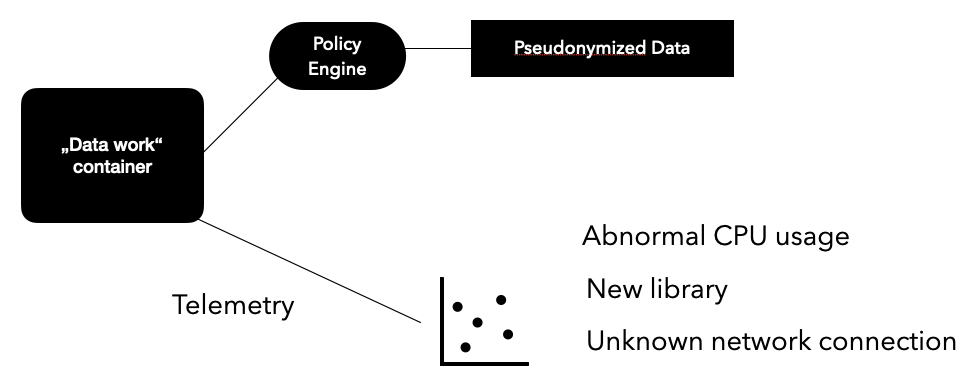 An example profile-based setup
You also could set up some synthetic runs with your data engineering team to get an idea of what types of tasks they would want to automate with such an agent. By doing so you are also setting up an observability baseline which can help you with monitoring as the agentic workflow becomes automated or self-steering.
Once you have a baseline and some controls that make sense for the "types" of work that a data engineering agent might perform, it's time to think through which monitoring controls make sense. You might have already locked down many things with your sandboxing, including external network requests and installation of unnecessary tooling.
But in addition, you might want to "watch" the agent to see if anything else might happen. For example, if a data engineering job is supposed to pull particular data from one system, reformat it and put it into another system, you would expect to see work that looks like that. If all of the sudden data was being deleted from the original system, or additional data was being pulled from an external source, you would want to flag that as suspicious and either intervene or have a human review the logs to determine if it was problematic.
As new tooling and new "jobs" get added, you want to reduce bloat, so start thinking now of profiles for workloads based on things like controls, access and things-to-be-done. The more specific you can be "data pipeline operator for production data" vs "data worker", the better opportunity you will have to ensure controls are specific and adequate.
In the beginning of your journey, you might not know all the answers to these questions. But one small step can help you start thinking in chunks, and that is keeping your own agentic sessions clean and focused.
Keeping Sessions clean + focused
When I talk with development teams about how they are using AI, I'm often surprised by the amount of people that let one session run everything. This leads to poor model performance due to irrelevant information being fed into the model and in general is not a good idea if you want the best results regardless of how "frontier" your model is.
Since many agentic software and frameworks allow for session-based memory, sandboxing and context management, I recommend leveraging that built-in isolation to practice thinking through observability and controls.
For example, you are investigating a new privacy evaluation setup where you want to experiment with building privacy evaluations for a specific use case. At first, you just want to experiment, so you go back and forth in a new session on options and probably use some of the web search skills to look at potential avenues for research (you can use my post as a starter ;) ).
You might then have a prioritized plan/list of libraries. My advice: have the "research agent" write a summarization of the process, priorities and libraries to test. Close that session, open a new one. Feed that document into the new agent, who is now your "experimentation agent". This agent will actually install libraries and tooling and set up your initial code to run and test out a few libraries and approaches.
Once your experimentation is done, you've probably made a decision on which tool fits best based on your workflows. Have the experimentation agent finish the decision records and archive the tooling that you won't use. Start a new code base with the tooling you will use. And start a new session.
That new session can get the original goal document and the results of the experiment and initial running code. Now it's time to build out the actual privacy evaluations you'll start using in your internal or production systems. Write the initial code, tests and evaluation data/instructions. Get it running as a contained service or well architected for whatever systems it will integrate with.
Finally, do a human review of that last setup. Does it work for you? Is it transparent enough? What do you need added or removed? Make small changes yourself and with any LLM assistance.
Save the final context from your "evaluation builder agent" in the documentation, so that if other people work on your evaluations, they have a good place to get started (both for human eyes and for LLM-prompting). Ensure it is not bloated to the best of your abilities.
 A small example of session usage one morning with my OpenCode setup exploring NVIDIA OpenShell for sandboxing3
In each of these steps, you could have been sampling observability data. If you did so, you might already start to notice patterns and potential controls. Does the evaluation agent need WebSearch? Does the research agent need to install things? Does the experimentation agent need repository access? By slowly defining boundaries, you'll get better at noticing what you need and what you don't, and you'll be owning far more of the governance thinking than running it all without any oversight or isolation.
Hopefully by running those experiments you have a better idea of how to leverage other techniques and controls like sandboxing, but also how to better define baseline privacy and security observability.
Open research questions
I'll be expanding this section over time as I continue my learning journey in engineering privacy and security observability, but I'll highlight here a few open questions:
-
Is it better to observe first and then block or the other way around? How to balance security and privacy needs with usability?
-
Is there a useful and transparent way to build adaptive policy adjustments that doesn't end up in alert fatigue or unnecessary privilege escalation?
-
Can we use machine learning fundamentals and heuristics to make agent observability more actionable?
What other questions do you have? I'd be excited to hear from you anytime, you can write me and let me know or reach out on LinkedIn.
If this post helped you, consider subscribing to my newsletter or my YouTube and sharing my work. I also offer privacy and security in AI advisory and trainings and a new Practical AI Privacy course and InfoQ certification on topics like security and privacy in AI/ML and personal AI.
-
(I recommend LINDDUN, STRIDE and Plot4AI, but also check out OWASP top 10 for agentic systems. ↩
-
You should likely actually start with less access and build understanding over time. As you build out these "profiles", you can then determine at what point agents get the similar access rights as a person on the team. In addition, I would recommend thinking through red teaming and threat modeling to determine what risks you are most concerned about and use that to also guide your observability choices. ↩
-
You can check out my video on the subject if you are also interested in learning more about sandboxing libraries. ↩