Using Claude Code with Locally-Hosted models
Posted on Di 07 April 2026 in personal-ai
I've been exploring privacy and security aspects of AI-assisted coding and also experimenting with those workflows for my own work. In doing so, I've got a pretty robust setup for using Claude Code with both the Anthropic backend and a locally hosted GPU machine in my at home AI lab.
I thought it would be useful for others to put together a guide on how to get started using Claude Code with a local-first setup.
Why, though?
Let's just cover why first, because I'm not here to tell you what model you should or shouldn't use. :) I am here, however, to tell you that Claude uses A LOT more tokens than the other models I'm using locally and takes about the same time to respond.
Of course, if you are already paying for Claude and you like it, keep doing you! But, if you are curious about local-first design or want to experiment as you are reaching your monthly token-limit, I think it's always a good idea to try out new things and see if they work for you.
In addition, being a privacy researcher, there are serious privacy benefits to keeping your data local and choosing what data goes into Anthropic (or other) servers. Testing this workflow out might help you determine when sending the data to Anthropic is worth it and when not. :)
System setup
I have a much longer article and YouTube video on getting your local AI lab setup, but you'll need to have a pretty beefy GPU or similar compute if you want your local models to compete with the rapid response and code quality of the cloud-based models.
For my setup I have 32GB of GPU memory. This means I can load several of the larger quantized models directly onto the GPU without problem. I've noticed my favorite coding buddy right now is Qwen-3.5-35B (quantized), but I've also tested out Qwen3-Coder, DeepSeek3, GLM-Flash. You can have a look on HuggingFace to get an idea of what models might fit on your computer.
I'm pretty certain if you have a smaller card (or chip) that you're going to deal with latency issues or even not being able to use certain models. I don't think you should let this deter you from giving it a try if only to start to have a workflow that you can use if you either get a bigger machine or when models get even more task-specific and smaller.
I will also be getting some other chips later this year, looking at you tensortorrent 😏. These will be cheaper than my current GPU and have about the same amount of memory. The catch will be that the setup might be a bit harder... Wanna get updates on how it goes? Give me a follow on YouTube, join my newsletter or find me on LinkedIn.
Claude Code intricacies
The initial catches getting Claude to communicate with a local model were not well documented, so here's the steps:
Change your environment variable for ANTHROPIC_*
Here's a brief breakdown of settings you should set, either in your Claude settings.json file or in your environment. I use environment variables because then I can switch models quickly. I point the BASE_URL to my local GPU server instead of localhost, but replace it for your setup. For example, you can also point it to an ollama server running locally.
ANTHROPIC_BASE_URL=http://YOUR_IP_ADDRESS:PORT
ANTHROPIC_DEFAULT_OPUS_MODEL=my-model
ANTHROPIC_DEFAULT_SONNET_MODEL=my-model
ANTHROPIC_DEFAULT_HAIKU_MODEL=my-model
You can do so like this in most shells by running the following
export ANTHROPIC_BASE_URL=http://localhost:8000
And reset for Claude Anthropic by running:
unset ANTHROPIC_BASE_URL
Set the model name when launching Claude Code
claude --model qwen35_35
Note: this is tricky when using models from HuggingFace because Claude Code deliberately doesn't allow slashes in the model name. This means that you also have to set up your GPU server with special model names. More on that in the next session.
Other settings that can come in handy
You may want to setup specific things on your server, such as thinking through caching1, context size and tool call support. Much of this will depend on how you serve, what type of machine you have and what models you want to use.
That said, Claude Code is VERY verbose, so if you are intent on using the Claude Code interface, I recommend you increase context size so that you have more flexibility. So far, setting context at 131072 tokens (server-side setting) has worked well for me, but for a few longer-running tasks, I've bumped it up to 256000.
Model serving: llama.cpp or vllm?
For most of my work with LLMs and VLMs I use vllm (check out my video on using vllm). It's easy to get started with and it has a bunch of out-of-the-box performance upgrades. vllm has a guide on getting started with Claude Code which is pretty straightforward to use for your own setup.
However, I had heard really good things about serving quantized models with llama.cpp. I also know that llama.cpp powers a good part of vllm, so why not go to the source?
Getting llama.cpp compiled to my GPU was a bit of a challenge, but I eventually found a guide with the right flags for my GPU2. There are instructions on how to also just run pre-built binaries in the llama.cpp repository. However, I wanted to compile it to make sure that it was using the GPU architecture to the best of its abilities.
This is a pretty good walkthrough on steps to get started should you run into issues or want to follow a step-by-step guide.
Once you have llama.cpp compiled and running, I recommend setting up a config file, so you can run llama-server once and serve multiple models.
Example config.ini file with one model:
[*]
# Global settings
jinja = true

[glm_4_flash]
hf-repo = unsloth/GLM-4.7-Flash-GGUF:UD-Q4_K_XL
jinja = true
temp = 0.7
ctx-size = 131072
top-p = 0.9 # originally 1
min-p = 0.01
fa = auto
To run the server you'll run, with the file path updated to point to your configuration file
./llama.cpp/build/bin/llama-server --models-preset PATH_TO_CONFIG_FILE --sleep-idle-seconds 300 --host 0.0.0.0 --port 9999
Model serving: which models?
Whether you're using vllm or llama.cpp (or something else), you'll need to choose what models to use. Here's some models I've tried so far that I could recommend:
-
Qwen 3.5 - 35B quantized by Unsloth: This has become my current goto coding companion. I would say it is certainly more generalist and relatively good at initial planning. Comparing it to Claude Opus is of course a stretch (it's probably a 10th of the size with a 10th of the information!), but if you're up for iterating and clarifying, you can get the same end result with a bit more of your own effort.
-
GLM Flash: I'm just getting started integrating this one into my workflows. So far I really like it for debugging, but it's probably powerful at other things that I haven't tested it on yet. Will keep you updated as I get to know the performance better via more testing.
-
Qwen3-Coder-Next (quantized): This was the model I started with, but for my workflows it seemed like it didn't match as well. However, I am not a software engineer! So I wanted to mention it because I think if you are writing software maybe this model is worth testing out.
-
Gemma3-27B (quantized): This one I've used for doing things like rewriting documentation, texts and project history/planning. I really like pairing with Gemma on text-workflows, and this is a pretty powerful text-to-text model.
You'll note right now that I've leaned heavily on Unsloth quantized models. I will definitely be comparing them with other quantized models soon, but I had to start somewhere and I thought I'd do so methodically. If you have any quantized models you prefer, please feel free to reach out.
Another good way to get to know what models are useful is to take a look at what's trending or what has a lot of downloads on HuggingFace. Just note that ANYONE can upload a model to HuggingFace, so just like you wouldn't install a random software package off the internet without verifying it's not malware, don't install a random HuggingFace model without verifying who built it (!!).
If you are serving models on the open internet (i.e. not across your local network), use the --api-key flag to authenticate your requests. Otherwise you're just giving people trolling the internet free compute and potentially asking for much more serious privacy problems. :)
I'll try to keep this list updated, but if you see a model that you think would fit well, feel free to reach out and tell me about it.
Putting it all together
Here's your steps to get it all running:
- Decide on a model you'd like to start with that also fits on your machine.
- Decide between vllm or llama.cpp and get that installed and running with your model of choice.
- Test out the connection and model name with a simple curl post to the other machine and the model name. example
- If all worked so far, set your environment variables and get claude running with --model [YOUR MODEL HERE]
- Send over your first prompt!
I hope you enjoy getting everything set up and running to try out local-only Claude Code usage. But don't stop there, because even though it's local, it doesn't mean it's always secure !!
Privacy and Security Advice
It wouldn't be very on-brand to not talk about privacy and security of using an AI coding assistant (even if it is using a local model), so let's dive into some basics that are useful to know.
Sandboxing 101
Claude Code comes auto-shipped with a Sandbox, but so far I've been very underwhelmed with the ability to block commands.3
Tip: For security best practices, check out Rich Harang's article on Sandboxing
I've outlined what the documentation says in this section, but so far some commands seem to be ignored. I will keep this section here because I hope that Claude Code eventually fixes the bugs, but my real advice is to launch Claude code within a VM and truly only put files there where it's fine to read/write/manipulate at will.
- Look into tool and file permissions.
To check what your default permissions are, you can run:
/permissions
You can change these in your Claude settings.json file. It is useful to start with more restrictive file settings (i.e. allowRead, allowWrite with a small list) first. You can combine allow/deny for more granularity.
For example, the following settings have a mixture of allow and deny, which clarifies exactly what local files in the project folder can be written, read and used.
  "sandbox": {
    "more_sandbox_settings_here": "the following is just a snippet !",
    "filesystem": {
      "allowWrite": ["."],
      "denyWrite": [".env", "settings/config.json"],
      "denyRead": ["./secrets/*", ".env*"]
    }
  }
Warning! This only denies the READ agent, but Claude Code + friends can still run cat, less, etc. I would not use this as an actual full protection.
You can also add tool-specific permissions, which can help especially if you want to expand the tools used. That syntax looks similar and has similar specificity rules. Note that these permissions currently live on the same key/value level as sandbox, but that can change so please check the latest documentation.
"permissions": {
  "allow": [
    "Bash(python *)",
    "Bash(ls *)",
  ],
  "deny": [
    "Bash(curl *)",
    "Bash(cat *)",
    "Bash(aws *)",
    "Read(**/.env)",
    "Read(**/.env.*)",
    "Read(**/secrets/**)"
  ],
}
Again, warning! So far I've been able to get around some of these deny lists by cleverly asking for other tools. This is by no means foolproof or actually sandboxed. >.<
To state again, I believe a strong VM solution or file encryption is probably the only way to actually block reads or other bash commands.
Because sandbox settings and defaults might change, I recommend checking any of this advice against Claude Code documentation on sandboxing.
- Check out the operating system, network and managed settings.
Outside of tool calls and file permissions, you might want to ensure that operating system and networking controls. By default processes that Claude Code spawns within a sandbox inherit the same sandbox properties; however, there is one caveat:
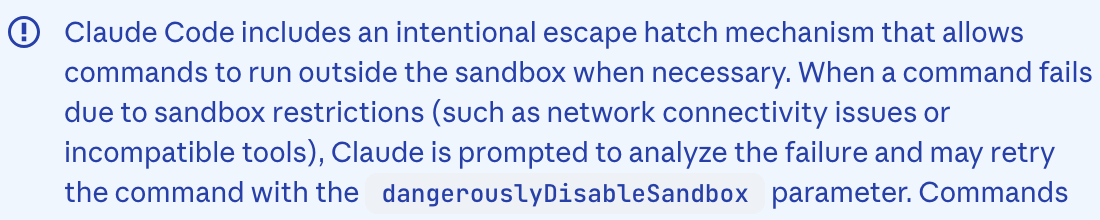
So you might want to set up that setting immediately. While you're at it you can also decide if you want to send telemetry data or not by setting the CLAUDE_CODE_ENABLE_TELEMETRY setting to 0 or 1.
In addition, there are networking rules you can set, such as approve or deny domains, and whether the sandbox can connect to local hosts and Unix sockets. Note that the more you allow for networking, the more security risk you open. Of course, you need to find a balance between denying everything, but if you are running this on an organization laptop/computer, I recommend bothering the security team to take a look and make some recommendations (if they haven't already).
If you are working in a security or engineering leadership team, you're probably interested in both the managed settings and devcontainers. For organization-wide settings, these can be used to override local settings and hopefully create a secure and private baseline across the organization.
- Containerize (or use VMs, jails or similar controls especially when running in a secure environment)
Claude Code sandbox is not truly sandbox safe, so containerize your Claude Code (or any AI-system) when running it in a secure, production or server environment which may have sensitive data or potential valuable targets.
This also involves starting to test your security assumptions around your environment, like investigating a security audit, pen-testing or threat modeling + red teaming for more trust and an overall better security posture.
If you are interested in starting to learn security vulnerabilities in AI systems, check out my free YouTube course on Purple Teaming AI Systems. I offer internal trainings and hackdays, so email me if your team might want in-house training.
For my setup I went so far as to get a separate computer to run Claude Code. I connect to it from my main work machine and it connects to my GPU machine over the local network. I move files that I've thoroughly tested and reviewed back to my main machine. Of course, this is my setup because I am also testing how to break security controls, and that's not a very good idea to do on your main machine. :)
Synthetic Data Generation
In many coding situations you might need example data to complete the exercise. Too often at organizations test data is real data sampled from a production environment. Instead it's advised to build synthetic data that meets your testing and LLM requirements.
Fully synthetic data
The safest option is to build out fully synthetic data using deterministic libraries to do so. For example, in Python the Faker library is a common choice for building out fully synthetic data.
To build out data like this, you'll need to only know the general data types and any relationships that must be maintained and then usually follow software documentation on how to build out such datasets. If you're also looking to more thoroughly test your code, you might want to add in property-based testing.
Why is it fully synthetic? Well, it's only using the data types and potential business logic and no other special information to generate data. However, this might not be what you need depending on what you're doing with your feature or software.
Sometimes you might need data that's informed by the actual statistics and distributions in your real data. If that's the case, you'll want to choose a statistical method for producing synthetic data.
Statistical methods for synthetic data
If you need data that has particular properties related to your real production data, you'll most likely choose a statistical method for generating your data.
First and foremost, it's important to create an understanding of both the privacy, testing and statistical requirements for the data. You'll want to engage anyone at your organization who might lead such efforts before building out modeling for the data.
I offer internal workshops and trainings on evaluating privacy enhancing technologies for synthetic data generation should you want to roll out such programs organization-wide.
There's always a privacy tradeoff between properly representing the data and leaking information that could lead to reidentification of real individuals. Not convinced? Check out Damien Desfontaines' USENIX talk on privacy leakage in synthetic data generator products. For this reason, it's important to gradually build out synthetic data and do so informed by real privacy requirements and dangers.
If you just need to make sure that two fields are appropriately linked (i.e. regional address and phone number matching) or if you need a number or attribute to lie in a particular distribution range (i.e. bounded within your real distributions), I would err on choosing a simple method like the fully synthetic and then building out modifications to alter any rows or entries that violate those rules.
However, if your requirements for linkage and attributes become more intertwined, there are some interesting methods that have been developed. In research that won a synthetic data generation challenge from NIST, the authors took certain attribute-based samples to develop a graph of data relationships. They then applied differential privacy to their distribution samples and were able to produce well-performing synthetic data with very strong guarantees.
There are also deep-learning based synthetic generation libraries that can "learn" or identify your data properties and generate data based on those properties. I want to remind you of the memorization problems related to deep learning models, especially ones that fine-tune on small datasets.
However, if you do want to build a deep learning setup for synthetic generation, I recommend looking into libraries or setups that also use differential privacy as part of their training. Differential privacy in deep learning combats pesky memorization and helps introduce measurable privacy into your data generation.
Spying on Claude Code
I've been investigating the inner workings of Claude Code software and prompt infrastructure for a few weeks now. Want to also spy on your "coding assistant"? Let me show you how.
I have a two-tiered setup at present because it helps me better analyze different parts of the data flows.
First I am using mitm to proxy direct traffic from Claude Code and log it into easily parseable JSON files. I have an example as a Gist to get you started.
Then, I also am using AgentSight which is an ebpf library with an interface that specifically looks at the Claude Code binary and follows process forks, system calls and sequences of such. You can read more about the design and usage in their ArXiv paper.
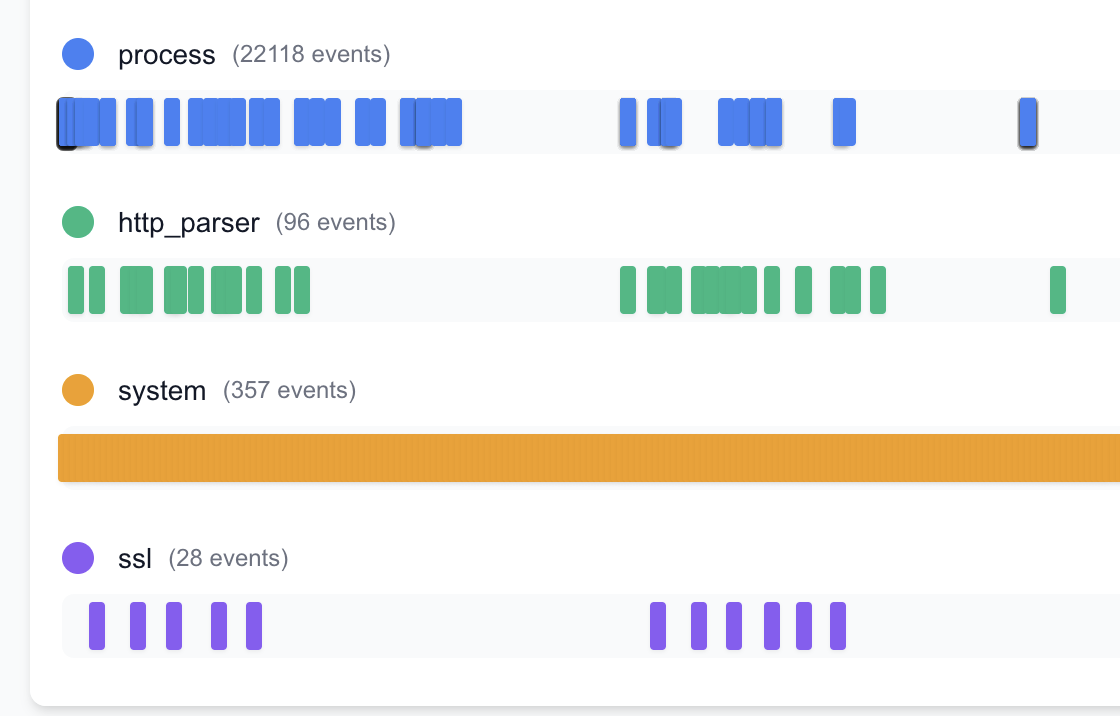
I built AgentSight from source (took a bit of manipulating the Makefile in my setup) and it's useful to set the CLAUDE_BIN as an environment variable when you call the built file. They also have prebuilt binaries but they didn't work for my setup.
I think in the future it might be useful for you to design your own Agent-Spyware by building specific ebpf libraries and packages, but I am by no means an expert on that. A tip from someone more informed says bcc is a good starting point.
If you build something and want any practitioner feedback, I'd be very interested.
I'll be posting more on agentic security and privacy and testing out alternatives like opencode. So far I really like the ease of tool calling via opencode in comparison, but I'm just getting started on my investigation...
I'll be updating this post as I iron out my workflows and gain more experience. I'll also be releasing a longer series on what I find from a privacy and security perspective later this year, so stay tuned! If you have burning questions or any interesting research you are working on in the space, feel free to reach out.
If this post helped you, consider subscribing to my newsletter or my YouTube and sharing my work! I also offer advisory and workshops and a new Maven Practical AI Privacy course on topics like security and privacy in AI/ML and personal AI.
-
There are several ways to control caching in both llama.cpp and vllm. Here's a useful starting point for llama.cpp and for vllm. Again, I would first use the system for a while before implementing caching so you can diagnose any potential caching pros and cons based on your initial experience and observations. ↩
-
For my NVIDIA Blackwell architecture + Debian setup this guide did the trick. But your architecture and the flags you need will differ, so try following the initial README or looking around with your GPU name + OS + compile llama.cpp. ↩
-
Even Claude can't figure out how to block reads from files in the working directory. ↩